Free Coins
Smash the City codes
SMASH is listed in the creator’s Roblox description for 5,000 Coins, checked October 12, 2026.
The creator-listed code
SMASH| Exact code | Announced reward | Source |
|---|---|---|
SMASH | 5,000 Coins | Creator’s Roblox description |
The table follows the creator’s published announcement on the date above. Copying the string here and claiming a reward inside Roblox are separate actions; the game’s redemption message determines your account’s result.
Latest official code check
On October 12, 2026, Kabooom Crew’s official description still lists one code: SMASH for 5,000 Coins. No additional code appears in that description. This is a check of the published announcement; use the game’s response to confirm your own redemption result.
The Roblox title currently carries a ☢️UPD label. That label and a changed game-update timestamp do not identify a new code, a changed reward or specific patch notes. For reactor advice, read the reactor observation guide; for earning-rate decisions, use the checkpoint comparison method.
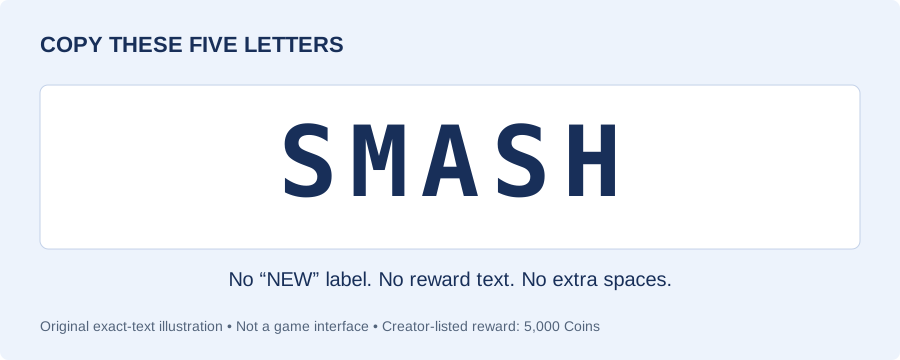
Use the exact code in the correct game
- Open Smash the City by Kabooom Crew on Roblox. Check the creator before joining.
- Copy
SMASHfrom this page, or select and copy the plain text manually. - Use the game’s code-entry field and submit only the code string. Keep reward labels and extra spaces out of the entry.
- Read the response inside the game and check your Coin balance before planning an unlock.
The copy button writes only SMASH to the clipboard. It does not sign in to Roblox, submit the code or claim Coins on your behalf.
When the entry does not work
Start with identity: a code for Kabooom Crew’s game should be used in that experience. A similar game title is not enough to match a code to a developer.
Next, compare the text character by character. Use the five letters SMASH; leave out quotation marks, the word “NEW”, the reward amount and line breaks. If the clipboard is blocked, select the visible code and copy it yourself.
Then use the message the game actually gives you. Keep that message alongside the code, the date and the game’s creator when reviewing a problem. Check the current official description before trying an older list again. Avoid sites that ask for your Roblox password to deliver a code reward.
What to do with 5,000 Coins
Use the reward as part of an unlock budget. Read your balance after redemption, then compare it with the price displayed for a weapon or map you want. A reward amount alone does not decide which unlock is best for your account.
For example, if your balance is 7,200 Coins and the unlock you are considering costs 10,000 Coins, the gap is 2,800 Coins. These are example inputs, not game prices. The Coin planner calculates the gap using your own numbers.
If the code Coins are already included in your displayed balance, do not add 5,000 a second time in a calculator. After choosing a target, use the weapon comparison method to decide whether that purchase serves your next session.
Official source
Code and reward come from the creator’s Roblox description, checked October 12, 2026. View Smash the City on Roblox or visit Kabooom Crew.
Find the next answer
Need the correct play link? Read the Smash the City game guide. Browse all topics in the Smash the City wiki. For a short answer about codes, unlocks or friends, use the player questions. When changing blast size, missile count or storm duration, follow the slider comparison guide.
Questions, answered
What is the Smash the City code for 5,000 Coins?
SMASH is the exact code in Kabooom Crew’s Roblox description, checked October 12, 2026. The announced reward is 5,000 Coins.
Does NEW belong in the code?
No. Copy only SMASH. Labels, reward text and formatting are not part of the creator-listed code.
Where can I check for more codes?
Read the description of Smash the City by Kabooom Crew on Roblox. Confirm the creator and the code text before using an announcement.
What should I do if a code is rejected?
Check the game’s creator, the exact code text and the message shown by the game. Compare the code with the current official description rather than repeatedly sending different spellings.
Does the announcement prove SMASH works for my account today?
The creator’s description checked October 12, 2026 lists SMASH for 5,000 Coins. The game’s current response and your balance determine whether a reward is available to your account; this guide records the announcement.